Frequently Asked Questions
Custom Quotes Questions
- How long does it take to receive a custom quote?
- How long are your estimates valid for?
- How do I proceed after I receive an estimate from you?
- How do I check the status of my quote request?
- Can't I just email you all the information instead of using a custom quote form?
Printing Questions
- What is digital printing?
- What are the advantages of digital printing?
- Will you send me a proof before the printing is started?
Files Question
- What file formats do you require? How do I set up my files correctly?
- What is bleed?
- Should I convert my files into CMYK?
- What resolution should I use for the images in my artwork?
Security & Privacy Questions
Site-Related Questions
Custom Quote Questions
How long does it take to receive a custom quote?
This depends on the complexity of your quote request. The vast majority of our estimates are done within 24 hours.
How long are your estimates valid for?
Estimates expire after 30 days. The estimate will be available on our website for that period of time and it will be removed after it expires. After that period we'll have to re-do the estimate.
How do I proceed after I receive an estimate from you?
Once your estimate is complete, you will receive a link to the web page with your estimate. After you have finished reviewing the estimate, please add it to your shopping cart, upload your files and proceed to checkout.
How do I check the status of my quote request?
Please select "Quotes" from "My Account" menu to check the status of your quote request.
Can't I just email you all the information instead of using a custom quote form?
Yes, you can. However, we will respond much faster if you fill out the custom quote form. This form contains all the information we need to complete the estimate. If you send us an email, there is a chance that you might forget a piece of information that is necessary to complete the estimate.
Printing Questions
What is digital printing?
Digital printing is a method of printing in which the data and images are printed directly from the computer onto paper.
What are the advantages of digital printing?
- Cheaper low volume printing. While the unit cost of each piece may be higher than with offset printing, when setup costs are included digital printing provides lower per unit costs for small print runs.
- Faster turnaround time.
- Variable data printing.
- Better for the environment. Digital printing uses dry ink or toner, which doesn't emit any VOCs in printing.
- More accurate proofing.
Will you send me a proof before the printing is started?
Yes! We can provide you with an email proof or print proof for color critical jobs. For color critical orders, we recommend requesting a print proof.
Files Questions
What file formats do you require? How do I set up my files correctly?
We need a 1-up, press-ready PDF file. If you have artwork that extends to the edge of the page we need the PDF saved with 1/8" bleed on each side. Please see the "Preparing PDF Files" section of this page for information about creating press-ready PDFs.
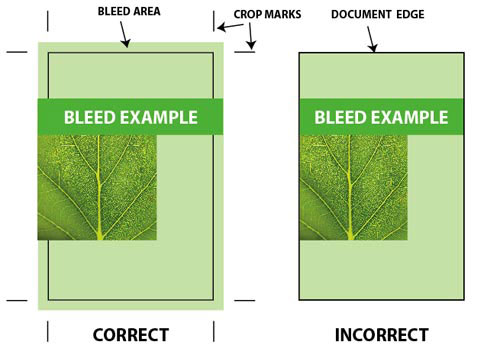
What is bleed?
If any element on your document layout makes contact with the document border you will have to use bleed. The trick is to place the element so that it goes over the border where the document will be cropped after printing.
The term bleed is used for all objects overlapping the border of your document.
Should I convert my files into CMYK?
No. Conversion from RGB to CMYK is done automatically on our workflow.
What resolution should I use for the images in my artwork?
We recommend that all images be saved at 300 dpi.
Security & Privacy Questions
Do you keep credit card information on file?
No. For your security, we don't keep any credit card information on file. If you would like us to keep your payment information on file, please contact us directly.
Is your website secure?
Yes. Our secure checkout system uses the latest secure server technology. Your order is submitted and retrieved with a secure connection to our server and remains secure at all times.
Will you share my information?
Absolutely not. We keep all customer information internal. Occasionally, you may receive offers and announcements from Maximum Printing & Graphics Inc. via e-mail. You may unsubscribe from these messages at any time.
Site-Related Questions
What browsers work the best with your site?
Our site should work with all browsers, however, we recommend the latest version of Google Chrome for Windows and Firefox for Mac.